Use this page with AI
Copy this into your coding assistant and add your request.
Read https://openiap.dev/docs/lifecycle and https://openiap.dev/llms.txt. Follow the reading instructions, detailed reference, and linked guides relevant to my task before making changes.
Inspect my existing project and reuse its framework and conventions. Ask me for missing product decisions. Implement the requested behavior and run the applicable checks.
Show the working result, the commands and actual test results, and any remaining limitations. Keep your explanation brief.

My request: [describe what customers should be able to do]Life Cycle
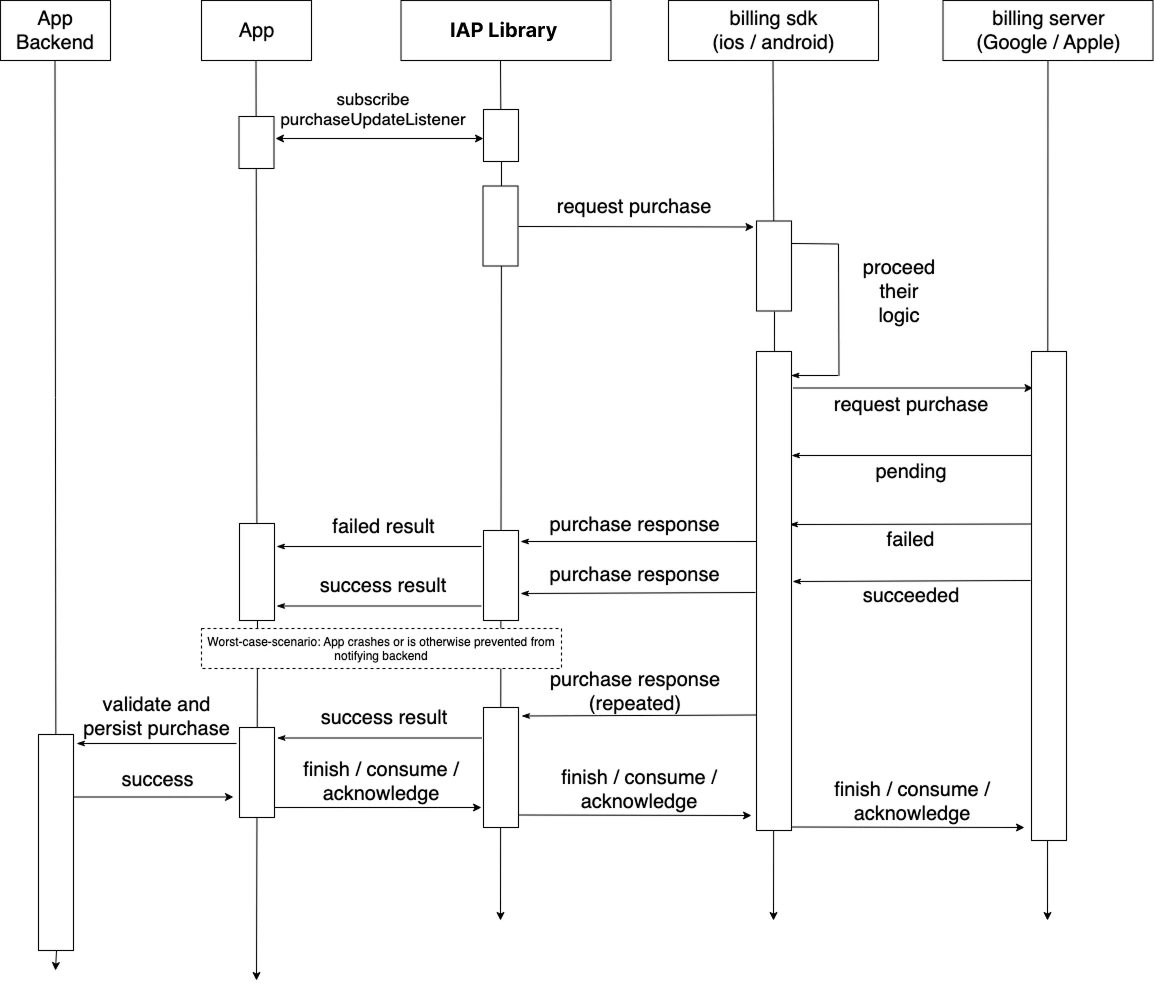
Understanding the complete lifecycle of in-app purchases is essential for proper implementation.
Lifecycle Phases#
1. Initialization#
Establish connection to the store service using initConnection. This must be done before any other IAP operations.
2. Product Discovery#
Fetch available products from the store using fetchProducts. Products must be configured in App Store Connect or Google Play Console.
3. Purchase Request#
User initiates purchase via requestPurchase. The platform payment UI is displayed.
4. Purchase Processing#
The store processes payment. Your app receives updates via purchaseUpdatedListener or purchaseErrorListener.
5. Purchase Verification#
aka. Receipt Validation - the legacy term used by Apple in StoreKit 1
Critical: Always verify purchases through a trusted server-side verifier, either your backend or IAPKit. Never trust local client purchase state alone in production. This applies to ALL purchase types: consumables, non-consumables, and subscriptions.
When to Verify
- After purchase - Verify purchase is legitimate before granting access
- On restore - Check current status (active/cancelled/refunded/expired)
- Periodically - Detect refunds and cancellations for subscriptions
6. Content Delivery#
After successful validation, deliver the purchased content or enable premium features.
7. Transaction Completion#
Call finishTransaction to complete the purchase. Unfinished transactions remain in queue and may cause issues. Set isConsumable=true only for consumable products, and false or omit for non-consumables and subscriptions.
8. Connection Cleanup#
When IAP is no longer needed, call endConnection to free resources.
State Management#
Connection States#
- Disconnected: Initial state, no store connection
- Connecting: Establishing connection to store service
- Connected: Ready for IAP operations
- Error: Connection failed, check error details
Purchase States#
- Pending: Purchase initiated, awaiting payment
- Processing: Payment being processed by store
- Purchased: Payment successful, needs validation
- Failed: Purchase failed or cancelled
- Restored: Previous purchase restored
- Deferred: Awaiting approval (e.g., parental consent)
Critical Considerations#
Always Handle Pending Purchases#
Check for pending purchases on app launch. Purchases may complete while app is closed:
On app launch:
1. getAvailablePurchases() → [Purchase]
2. For each purchase:
   → validate purchase
   → deliver content
   → finishTransaction()
Transaction Queue Management#
iOS maintains a persistent transaction queue. Unfinished transactions will be delivered on every app launch until finished.
Android Acknowledgment Window#
Android purchases must be acknowledged within 3 days or they will be automatically refunded. Always call finishTransaction promptly.
Subscription Lifecycle#
Subscriptions have additional states:
- Active: Subscription is current and valid
- Expired: Subscription period ended
- In Grace Period: Payment issue, but access maintained temporarily
- In Billing Retry: Payment failed, retrying
- Paused: Subscription paused by user (Android only)
- On Hold: Subscription on hold due to payment issue
For detailed platform-specific subscription handling, see the Subscription guide.