Use this page with AI
Copy this into your coding assistant and add your request.
Read https://openiap.dev/docs/example and https://openiap.dev/llms.txt. Follow the reading instructions, detailed reference, and linked guides relevant to my task before making changes.
Inspect my existing project and reuse its framework and conventions. Ask me for missing product decisions. Implement the requested behavior and run the applicable checks.
Show the working result, the commands and actual test results, and any remaining limitations. Keep your explanation brief.

My request: [describe what customers should be able to do]Example
The OpenIAP example uses the same product, subscription, restore, and verification screens across store targets. The written walkthrough stays shared; each video card lets you switch between Apple, Google, Horizon OS, and Fire OS recordings for the same action.
Goal for this walkthrough: prove the store adapter works end to end: catalog lookup, purchase launch, purchase update handling, verification, restore, and final transaction fulfillment.
Demo Overview#
Each clip is recorded from the store-specific example build, but the sequence is intentionally the same so the article can compare store behavior without duplicating the whole document.
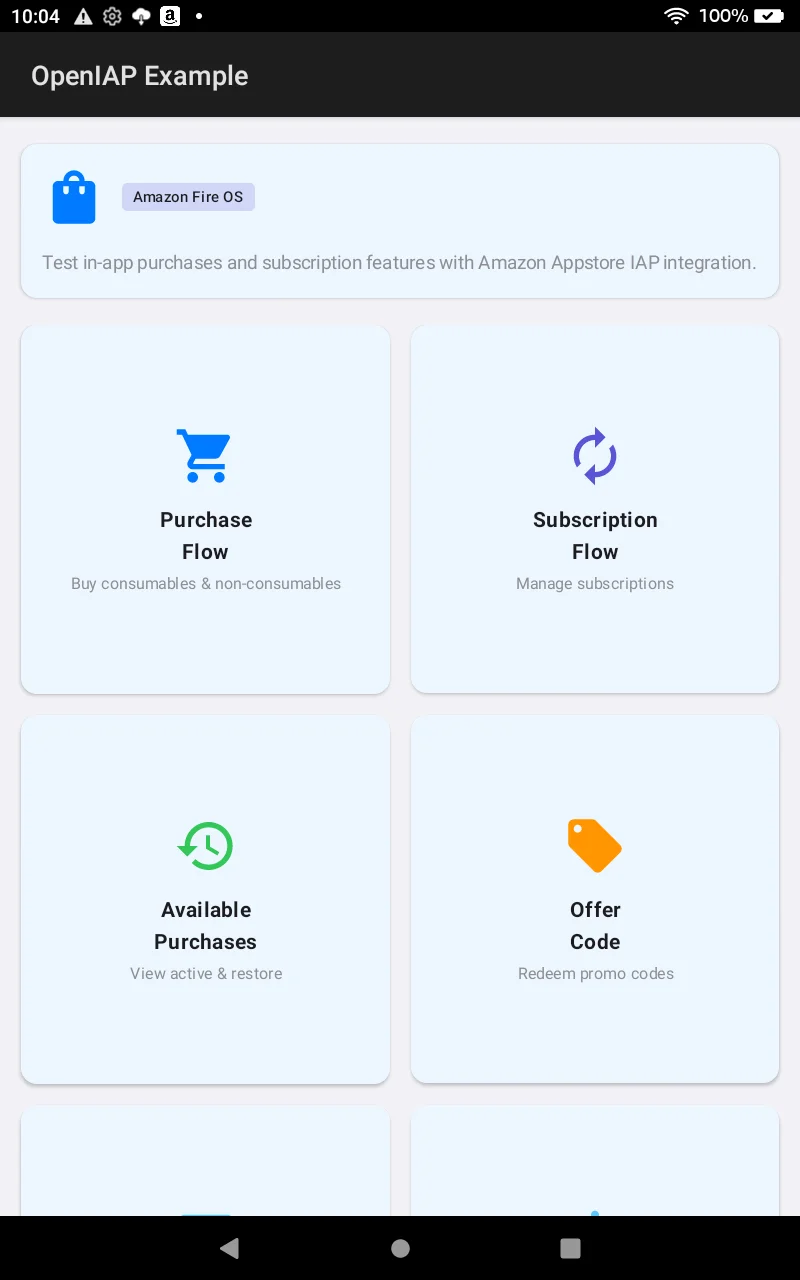
- Confirm the walkthrough is using the intended store target before touching a purchase button.
- Record each action separately: purchase flow, subscription flow, available purchases, and verification.
- Keep the narration focused on the shared OpenIAP lifecycle: initialize, fetch, request, verify, finish, and refresh.
Proof Points#
These are the details the video should make obvious before the article moves into framework code. They keep the page store-first instead of reading like a generic UI tour.
| Area | What this target proves | Where it appears |
|---|---|---|
| Adapter selection | The selected build links the matching store adapter: StoreKit 2, Google Play Billing, Meta Horizon Billing, or Amazon Appstore IAP. | Home badge, build flavor, and setup notes. |
| Connection | initConnection prepares the store listener before product or transaction calls run. | First load of each purchase screen. |
| Catalog | fetchProducts maps store catalog data into OpenIAP product and subscription types. | Product and subscription rows. |
| Purchase identity | Store transaction IDs, purchase tokens, receipt IDs, or signed transaction data are carried through the OpenIAP purchase shape for verification and finish. | Purchase details and verification payload. |
| Fulfillment | finishTransaction runs only after validation and entitlement grant. | Purchase flow and unfinished transaction restore flow. |
Purchase Flow#
Purchase Flow
Product screen, StoreKit catalog state, and the sandbox purchase sheet for an in-app product.
This menu covers consumables and non-consumables. The screen calls initConnection, then fetches the example in-app SKU list with fetchProducts. In the video, show the verification selector first, then the product rows, and then the Buy action.
| Step | Code path | What to explain |
|---|---|---|
| Load products | fetchProducts with the in-app product type. | Store catalog data is normalized into OpenIAP products such as dev.hyo.martie.10bulbs, dev.hyo.martie.30bulbs, dev.hyo.martie.certified. |
| Start purchase | requestPurchase with the store-compatible request shape for that target. | The button launches the store purchase sheet for one selected product and then waits for a purchase update. |
| Handle update | The screen watches the latest OpenIAP purchase update emitted by the store listener. | This is where the app waits for the store result instead of treating the button tap itself as proof of purchase. |
| Verify and finish | Verify with IAPKit or your backend, call finishTransaction, then refresh getAvailablePurchases. | Consumables are consumed; non-consumables are fulfilled. Access should be unlocked only after the verification result is accepted. |
The store-specific work belongs in the adapter. The app code continues to fetch, request, verify, finish, and refresh using the OpenIAP lifecycle.
Subscription Flow#
Subscription Flow
Subscription product screen and StoreKit sandbox confirmation for the monthly premium plan.
This menu demonstrates recurring products. The example checks current subscription state, fetches product metadata, and then launches the subscription purchase request.
| Step | Code path | What to explain |
|---|---|---|
| Check state | getActiveSubscriptions with the subscription SKU list. | Separate "what is currently active" from "what can be purchased" before showing the offer rows. |
| Load offers | fetchProducts with the subscription product type. | Subscription products such as dev.hyo.martie.premium, dev.hyo.martie.premium_year are displayed as normalized OpenIAP subscription products. |
| Start subscription | requestPurchase with the store-compatible subscription request shape for that target. | The selected video shows the target store's subscription confirmation, management, or tester-account requirements. |
| Finalize | Verify with IAPKit or your backend, call finishTransaction, then refresh getAvailablePurchases. | Subscriptions are not consumed like consumables. Finishing records store fulfillment while the app keeps entitlement state driven by verified subscription status. |
Available Purchases#
Available Purchases
Current entitlement recovery and purchase history backed by StoreKit transaction state.
This menu is the entitlement recovery story. On entry, refresh, and restore, the screen calls getAvailablePurchases so the app can rebuild local access from the active store account.
| Step | Code path | What to explain |
|---|---|---|
| Refresh | getAvailablePurchases. | The app can rebuild entitlement state after launch or after a network/store reconnect. |
| Restore | restorePurchases or getAvailablePurchases. | This is the recovery path for reinstalls, device changes, and account changes. |
| Group purchases | The screen groups active subscriptions, owned non-consumables, and pending consumables. | The split gives the article clear talking points: active access, permanent ownership, and transactions that still need fulfillment. |
| Finish unfinished | Unfinished rows call finishTransaction after validation. | Restore and verification are not enough by themselves: the store transaction must still be fulfilled or consumed. |
Purchase Verification#
Purchase Verification
Verification selector and product context before sending the StoreKit JWS to IAPKit.
This clip shows where the app switches from local store state to trusted validation. IAPKit provider verification uses verifyPurchaseWithProvider, while custom backends can call the same store-specific verification services from a trusted environment.
| Part | What to explain |
|---|---|
| Provider payload | Send the matching IAPKit payload for Apple, Google, Amazon, or Horizon instead of shipping provider secrets in the app. |
| Store evidence | Include the signed transaction, purchase token, receipt ID, or entitlement data required by the selected store. |
| Unlock decision | Grant access only after the verified response matches the expected product and account state. |
| Finish order | Finish the transaction after verification and entitlement grant. |
Verification is the gate; finishing is the receipt lifecycle cleanup. Do not call finishTransaction as the only proof that content should be unlocked.
Recording Readiness#
Before publishing the article or sharing the video, verify the target store setup so each tab reads as a real integration rather than a generic screen recording.
| Checklist | Expected state |
|---|---|
| Build target | Install the matching example build for Apple, Google, Horizon OS, or Fire OS before recording that tab. |
| Catalog IDs | Store catalog entries should match the example in-app and subscription SKU lists. |
| Tester account | Use a sandbox, license tester, Quest tester, or Amazon tester account that can open the purchase sheet. |
| Verification key | Configure the IAPKit key or backend endpoint before recording the verification clip. |
| Amazon Sandbox receipts | Enable Allow Amazon App Tester / RVS Cloud Sandbox in the IAPKit project settings, then send sandbox: true for App Tester receipts. |
| Amazon subscription receipts | Restore can return dev.hyo.martie.premium.base with the catalog term in currentPlanId. Query both terms and the base for ownership; match the exact term for plan display and the base for backend verification. A missing or unrelated term grants no access. Preserve the original purchase for completion. |
| Amazon App Tester limits | App Tester can label other terms as monthly; compare the requested SKU and receipt plan. RVS Cloud Sandbox generates a synthetic termSku. Use Live App Testing to certify renewal and access-end behavior. |
Framework Handoff#
The native examples prove the store layer first. App teams can move the same lifecycle into Expo, React Native, Flutter, Kotlin Multiplatform, .NET MAUI, and Godot without changing the OpenIAP operation names.
| Flow | Shared API | Framework note |
|---|---|---|
| Product and subscription loading | fetchProducts | Available in Expo, React Native, Flutter, Kotlin Multiplatform, .NET MAUI, and Godot with the same OpenIAP operation name. |
| Starting a purchase | requestPurchase | The request shape changes by language, but the lifecycle stays the same: pass a SKU, wait for the purchase update, then verify. |
| Restore and entitlement recovery | getAvailablePurchases | Use this after launch, after restore, and after finishing a transaction to rebuild local entitlement state. |
| Managed verification | verifyPurchaseWithProvider | Use the provider payload for the selected store. The request shape changes by language and platform, but the lifecycle remains fetch, request, verify, finish, and refresh. The code below verifies an Amazon consumable; keep receipts unfinished when any acceptance check fails. |
| Final fulfillment | finishTransaction | Finish after verification. Consumables are consumed; owned products and subscriptions are fulfilled without consuming. |
import {
  type Purchase,
  fetchProducts,
  requestPurchase,
  getAvailablePurchases,
  finishTransaction,
  verifyPurchaseWithProvider,
} from 'expo-iap';

const products = await fetchProducts({
  skus: ['dev.hyo.martie.10bulbs'],
  type: 'in-app',
});
const [product] = products ?? [];
if (!product) throw new Error('Amazon product not found');

await requestPurchase({
  request: { google: { skus: [product.id] } },
  type: 'in-app',
});

async function onPurchaseUpdated(purchase: Purchase) {
  if (
    purchase.store !== 'amazon' ||
    purchase.storeId !== 'amazon' ||
    purchase.productId !== product.id ||
    purchase.purchaseState !== 'purchased'
  ) return;

  const result = await verifyPurchaseWithProvider({
    provider: 'iapkit',
    iapkit: {
      apiKey: 'YOUR_IAPKIT_PUBLISHABLE_KEY',
      amazon: {
        expectedProductId: purchase.productId,
        receiptId: purchase.purchaseToken ?? purchase.id,
        sandbox: true,
      },
    },
  });

  const verified = result.iapkit;
  if (
    verified?.isValid === true &&
    verified.store === purchase.store &&
    verified.storeId === purchase.storeId &&
    verified.environment === 'Sandbox' &&
    verified.productId === product.id &&
    verified.state === 'ready-to-consume'
  ) {
    await finishTransaction({ purchase, isConsumable: true });
    await getAvailablePurchases();
  }
}
Video Script#
Keep each clip short, but make the action and the evidence visible. This structure gives the article/video a clean sequence instead of a raw list of recordings.
| Clip | Open with | Close on |
|---|---|---|
| Overview | Show the store target and explain that this is the store adapter pass of the shared OpenIAP example flow. | Land on the three menus: purchase flow, subscription flow, and available purchases. |
| Purchase Flow | Show the verification selector, then the product rows. | Show the purchase result or the exact tester/catalog requirement if the store sheet cannot proceed. |
| Subscription Flow | Show monthly and annual subscription rows loaded through OpenIAP. | Show the store-specific subscription management language. |
| Available Purchases | Tap refresh or restore. | Show restored count, grouped purchase rows, or the empty state with the correct store account wording. |
| Purchase Verification | Show the configured verification option. | Explain what receipt/token leaves the client and why the app finishes only after a verified result. |
Build and Run#
Source: packages/google/Example/
cd packages/google
./gradlew :Example:assembleAmazonDebug
./gradlew :Example:installAmazonDebug

adb shell monkey -p dev.hyo.martie -c android.intent.category.LAUNCHER 1