Use this page with AI
Copy this into your coding assistant and add your request.
Read https://openiap.dev/docs/guides/store-providers and https://openiap.dev/llms.txt. Follow the reading instructions, detailed reference, and linked guides relevant to my task before making changes.
Inspect my existing project and reuse its framework and conventions. Ask me for missing product decisions. Implement the requested behavior and run the applicable checks.
Show the working result, the commands and actual test results, and any remaining limitations. Keep your explanation brief.

My request: [describe what customers should be able to do]Community store providers
Use an independently maintained Apple or Android store with any OpenIAP SDK. Both platform bindings follow the same provider contract. Registration is optional. Purchase APIs stay the same.
A provider must already implement the store’s billing SDK. OpenIAP ships official Apple App Store, Play, Horizon, and Amazon providers.
How providers fit together#
One contract, two native bindings
- Your appPurchase UI and entitlement delivery
- OpenIAP SDKThe same purchase APIs in all six frameworks
- openiap-coreApplication manifest → factory
- Selected providerStore-specific mapping and lifecycle
- Store SDKPlay, Amazon, Horizon, or a community SDK
Android setup: Maven artifact + openiapStore + openiapProvider. Select a provider.
A purchase crosses two boundaries
- Request
The app calls requestPurchase with a store product id. The provider opens the store checkout.
- Receive
The provider maps the store callback to purchaseUpdated or purchaseError. Pending purchases grant no entitlement.
- Verify and grant
The app sends the receipt to a backend that supports this store. That backend verifies it and grants the entitlement.
- Finish
After successful delivery, the app calls finishTransaction. The provider acknowledges or consumes the store transaction.
The store provider runs on the device. A Commerce Protocol provider runs on your backend. Selecting a store provider does not add receipt verification support to a backend.
Try a real Amazon SDK binding#
A community package example for provider authors
Build a community provider outside OpenIAP, then run the official Expo example against it. This repository adapts OpenIAP’s Amazon implementation to test external packaging and integration; it is not a second independently designed implementation.
For FireOS apps, use the official Amazon integration and its openiap-google-amazon artifact. This community package is an educational example and is not recommended for production purchases.
storeId: amazon_examplestore: unknownCommunity package · Amazon App Tester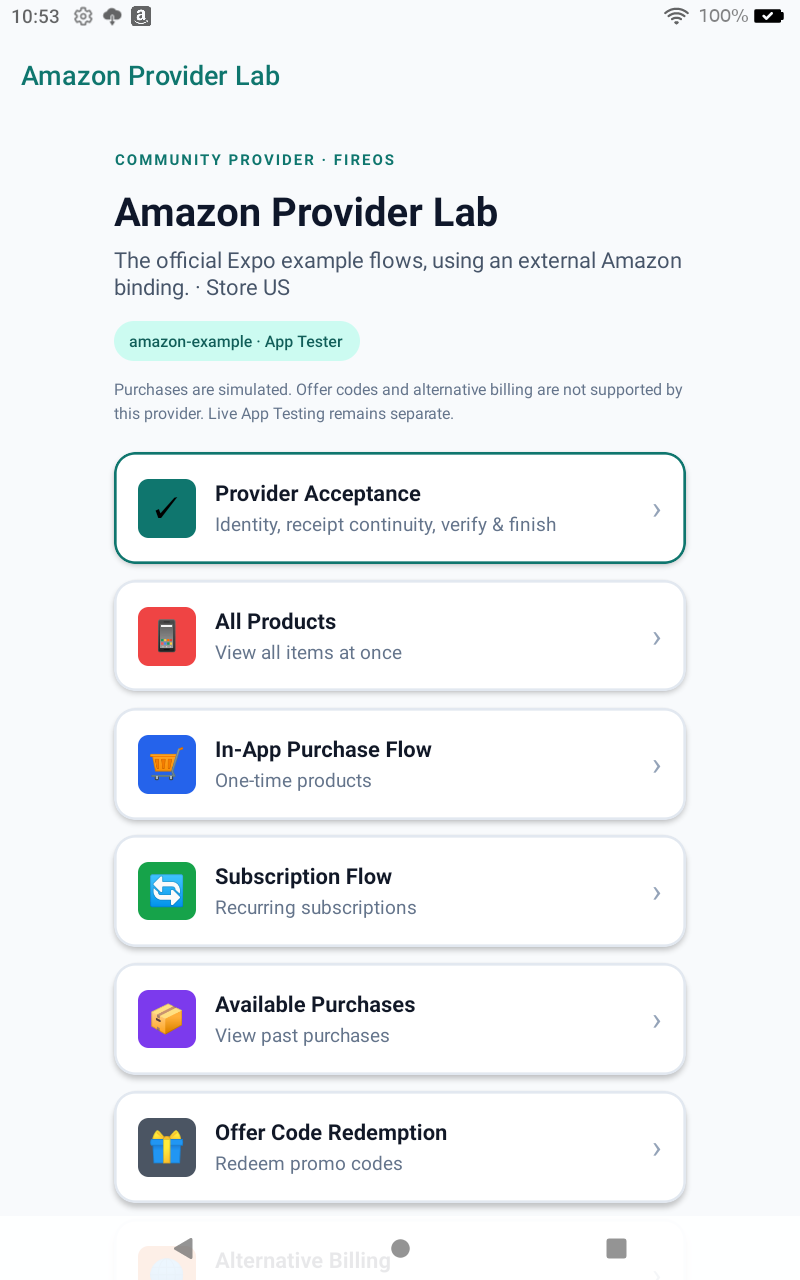
01Same example, new provider
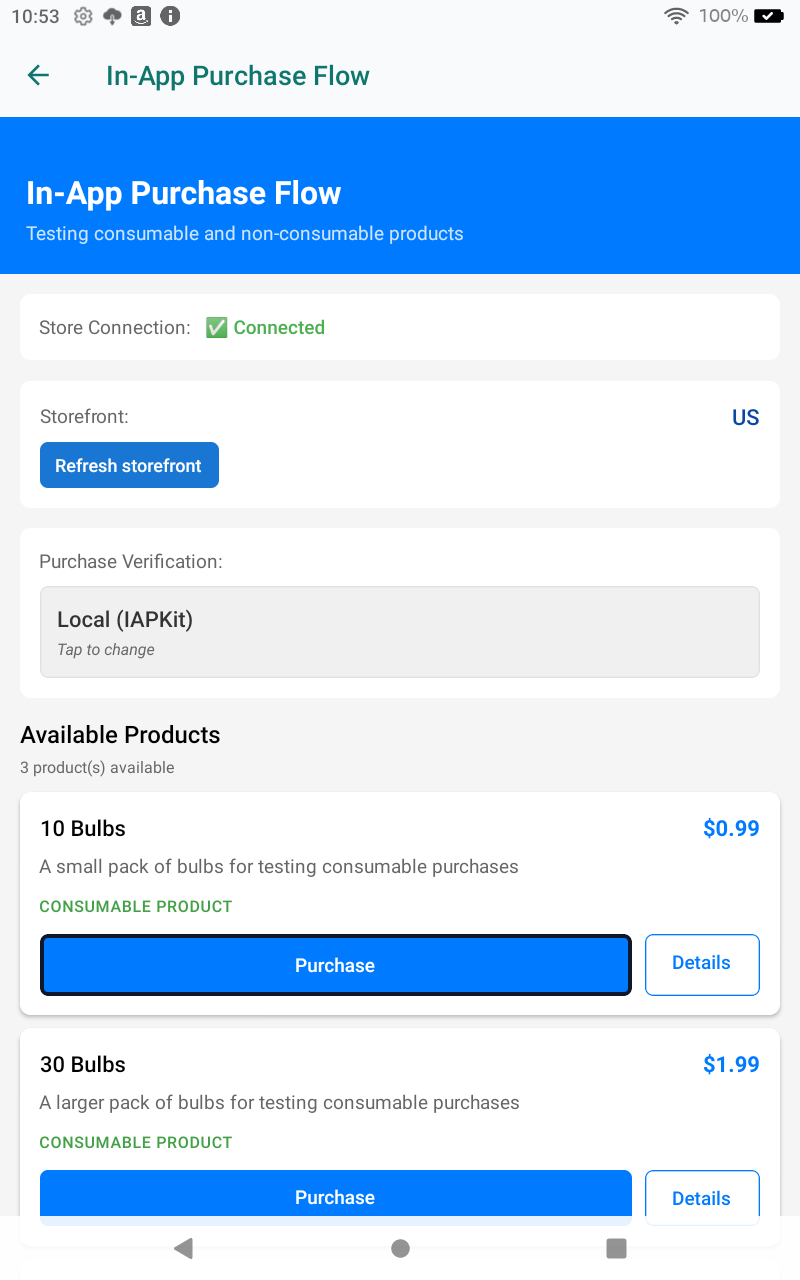
02Products from the Amazon SDK
03Inspect the extension boundary
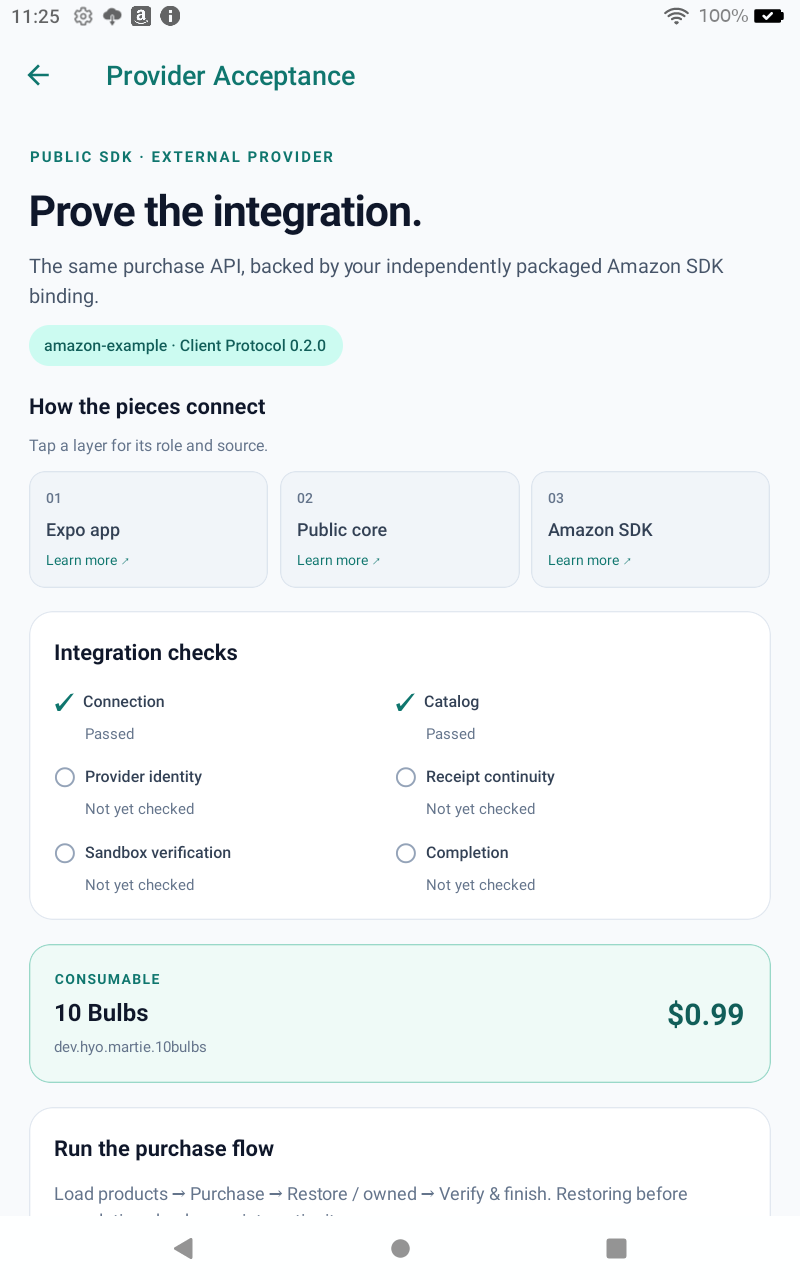
04Inspect each integration layer

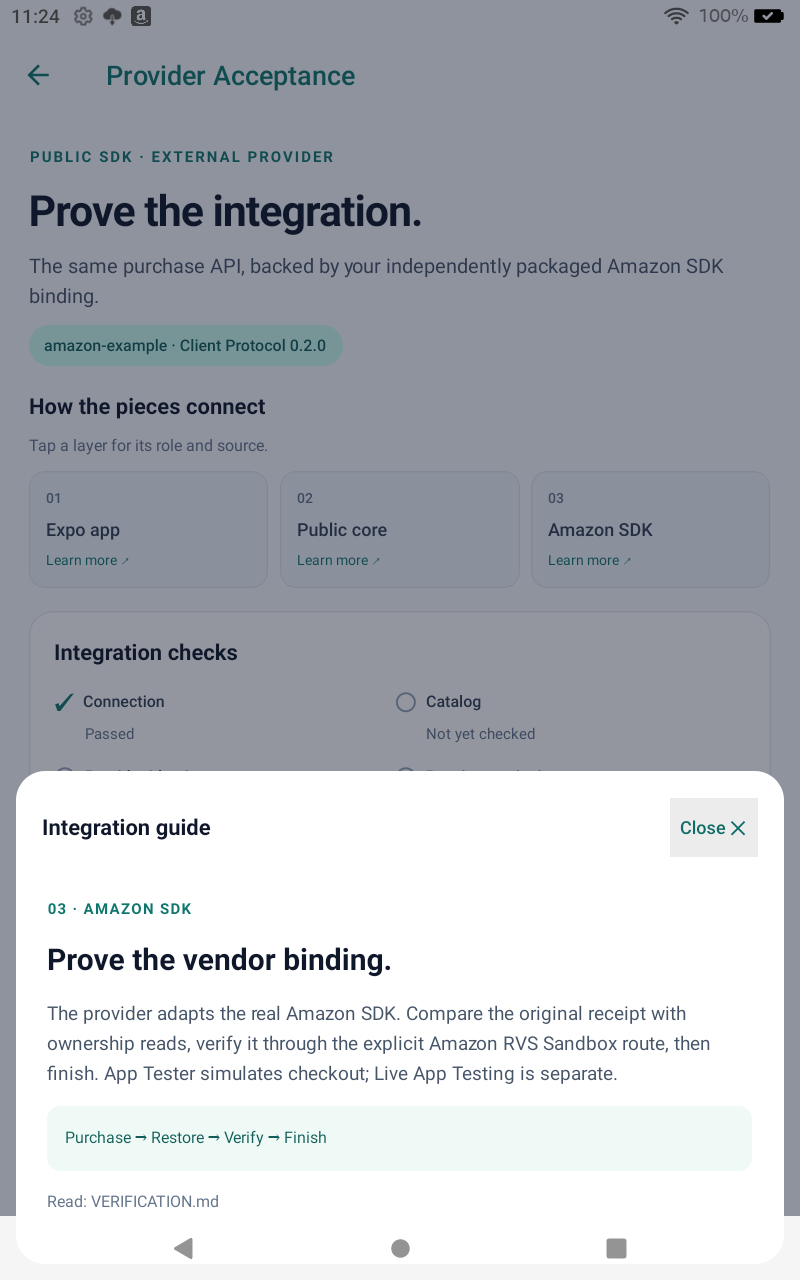
05Verify, finish, read ownership
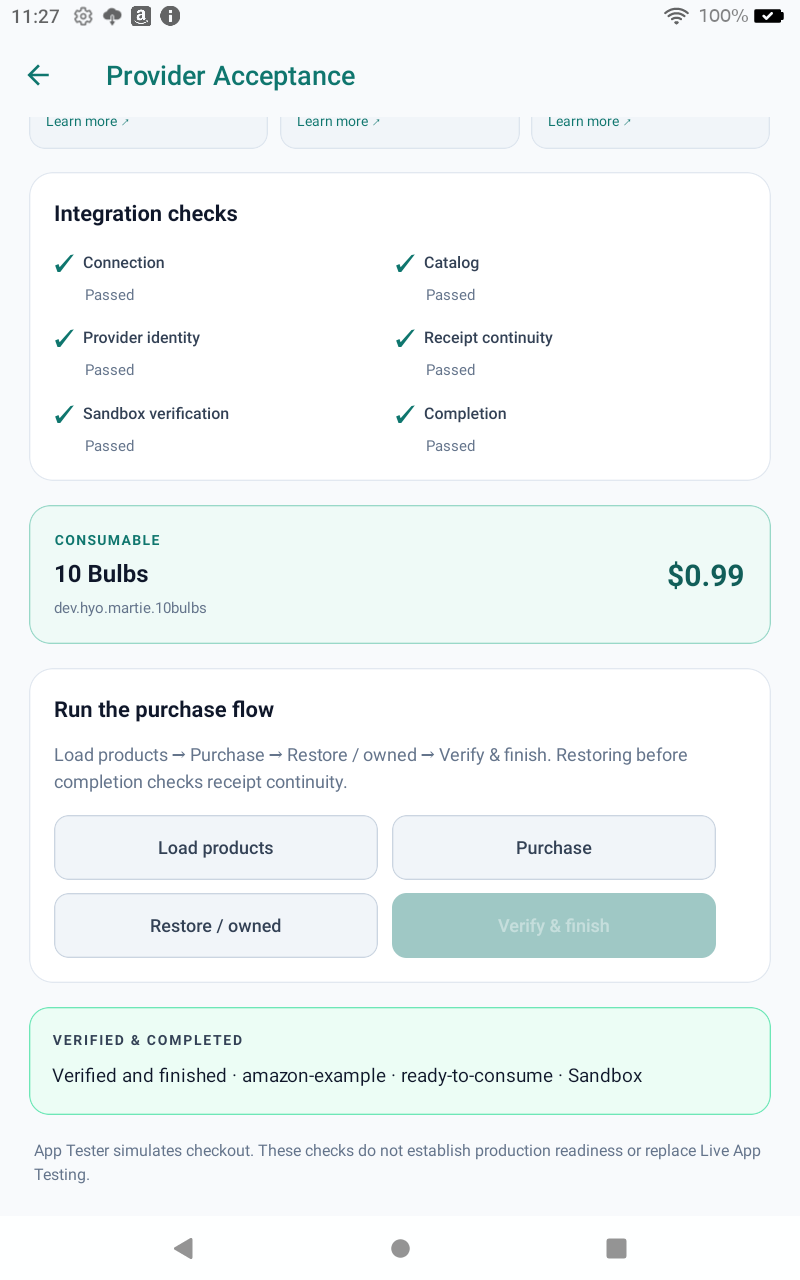
This is a dated validation snapshot, not certification. Read the evidence and limits, machine-readable conformance report and CI runs. The current unpublished snapshot passed Expo local-package checks and Fire App Tester purchase, cancellation and pending recovery against public RC inputs. The README separates historical GitHub Packages results and other-framework configuration; this does not prove registry parity across every framework.
Follow the implementation
provider/build.gradle.ktsImplement the contractA discoverable factory creates the provider and declares its identity and capabilities.provider/src/main/kotlin/dev/openiap/provider/fireos/FireOsProviderFactory.ktWire startup and discoveryFactory metadata, early Amazon listener registration and protected response delivery.provider/src/main/AndroidManifest.xmlSelect it in the consumerThe public Expo config plugin selects amazon_example and its artifact; the app imports expo-iap.example/app.config.jsKeep verification explicitMap this known community receipt to Amazon; validate product, environment, state and storeId before finishing.example/src/utils/vegaRuntime.tsProve behavior and packagingPublic conformance, consumer tests, optimized builds and observed device results, with their limits.VERIFICATION.mdRun the same comparison
- Prepare public inputs. Clone the repositories beside each other and follow the example README. The preparation script downloads the exact public Expo RC, builds only the conformance suite locally and packs the provider. Core comes from Maven Central.
- Compare the official screens. All Products, Purchase Flow, Subscription Flow and Available Purchases use the same screen code as the official Expo example. Offer Code and Alternative Billing show this provider’s unsupported capability instead of starting a Play flow.
- Run Provider Acceptance. Load products → Purchase → Restore / owned → Verify & finish. Compare the callback and restored receipt before verification. Configure the development backend and its publishable key first.
- Try rejection and recovery. Cancel checkout, defer approval, and retry an unfinished purchase after approval. No entitlement or completion is allowed while pending or when verification fails. Record builds, controlled tests and store testing separately.
Copied code and adaptations are listed in the provenance manifest. Showing a subscription screen does not establish a full subscription lifecycle pass. This example is an implementation reference, not a production payment app.
Implementation brief for developers and AI coding agents
Use this brief with the contract and repository. It states the integration boundary and acceptance criteria; a successful build alone is insufficient.
Goal: implement a community OpenIAP Android store provider in a separate repository.
Reference: https://github.com/hyodotdev/openiap-google-amazon-community/tree/63c8541d265d95592178a32b51ce6f127c18073b
Contract: https://openiap.dev/docs/guides/store-providers
For FireOS apps, recommend the official integration: https://openiap.dev/docs/setup/store/amazon. This repository is an educational community package example.

1. Read README.md, AGENTS.md, VERIFICATION.md, openiap-revision.txt and the provenance manifest.
2. Depend on public openiap-core plus the vendor SDK. For an RC, build conformance from its exact Google tag in an isolated local Maven repository; keep core public. Do not include OpenIAP native source projects or an official store-provider artifact.
3. Use a unique storeId and store=unknown. Do not extend the frozen store enum. Declare only implemented capabilities.
4. Wire factory discovery, vendor startup requirements and optimized-build retention. Select storeId + provider coordinates through the public framework configuration.
5. Preserve identity and the original receipt through callbacks, ownership reads, verification and completion. Request failures deliver exactly one canonical error event.
6. Pending, cancelled and rejected purchases grant no entitlement and remain unfinished. Verification needs an explicit backend adapter for the underlying store; unknown never means Google Play.
7. Validate result identity, product, environment and fulfillment state before granting entitlement and finishing. Exercise retry/recovery and ownership after completion.
8. Run the mandatory public conformance profile, consumer tests, typecheck and optimized build. Record controlled transport, App Tester and Live App Testing independently. Never infer production readiness from simulated checkout.
9. Keep the official example screen structure so consumers can compare the same functionality. Add clear unsupported-capability states and a reproducible acceptance path.
Add a community package to an existing Expo app#
Keep expo-iap and your purchase screens. Add the provider’s native package and configure the Android build to select it. This walkthrough uses the FireOS community example; its repository name differs from its installation name, @hyodotdev/openiap-provider-amazon-example. For a maintained FireOS app, use the official Amazon integration.
- Prepare matching public RC inputs. Version 0.0.2 is unpublished. Follow the pinned example README to build the provider and local conformance suite against public core and Expo RCs. Install the exact Expo RC listed in the package’s peer dependencies. Historical GitHub Packages versions use the old hyphenated id and fail the current contract. Rebuild the provider for each RC and for stable.
- Install the prepared provider tarball. Preparation writes its path into
example/package.json. In another Expo app, install that tarball by its absolute path:Replaceshbun add --exact /absolute/path/to/openiap-google-amazon-community/.local/community-provider-HASH.tgzHASHwith the generated filename. The package contains its provider Maven repository; core comes from Maven Central. No registry token is needed for this local installation. - Select one IAP plugin per build. Keep the
expo-iapdependency and imports. Remove its existing plugin entry, put your current IAP options in one object, and add the selected entry inapp.config.js. Keep your other plugins and app settings.Move store selection out of the shared options: remove old
android.store,android.provider,modules.horizon,modules.amazon.fireOS,modules.amazon.vegaOSandandroid.amazon.vegaOS. Unset the oldEXPO_IAP_FIREOS,EXPO_IAP_HORIZONandEXPO_IAP_VEGAenvironment flags. Preserve unrelated options, including your Appstore public-key path.Use the same store setting in your EAS profiles:jsconst iapOptions = { android: { amazon: { appstoreKey: './keys/AppstoreAuthenticationKey.pem' }, }, }; const community = process.env.ORG_GRADLE_PROJECT_openiapStore === 'amazon_example'; module.exports = ({ config }) => ({ ...config, plugins: [ ...(config.plugins ?? []), community ? ['@hyodotdev/openiap-provider-amazon-example', iapOptions] : ['expo-iap', { ...iapOptions, android: { ...iapOptions.android, store: 'play' }, enableLocalDev: false, }], ], });Use local builds until you distribute the unpublished provider tarball to your build workers; absolute paths are not uploaded automatically. Both profiles use the same exact public Expo RC and public native artifacts. The plugin supplies its provider repository and disables local native-source mode. Keep the existing application id and catalog, and retainjson{ "build": { "play": { "env": { "ORG_GRADLE_PROJECT_openiapStore": "play" } }, "amazon-community": { "env": { "ORG_GRADLE_PROJECT_openiapStore": "amazon_example" } } } }android.amazon.appstoreKeyfor Appstore builds. - Rebuild the native Android app. Expo Go and a JavaScript reload cannot install a native provider.Usesh
export ORG_GRADLE_PROJECT_openiapStore=amazon_example bunx expo prebuild --platform android bunx expo run:android --deviceplayfor a local Play build. Rerun prebuild and rebuild after switching the profile or updating the provider. - Check the selected provider. Your existing
useIAP, product, purchase, restore and finish APIs stay the same. Purchases from this example carrystore: 'unknown'andstoreId: 'amazon_example'. Configure the backend for Amazon receipt verification, grant entitlement only after valid verification, then finish. The native package does not install a server verification adapter. Follow the verification flow and observed limits.
Choosing a Samsung, Huawei, or Xiaomi provider#
We welcome community providers for stores such as Samsung, Huawei, and Xiaomi. OpenIAP does not yet supply or certify packages for these stores. Before installing a provider, expect its maintainer to publish:
- A native adapter for that store’s billing SDK, supported platforms and compatible OpenIAP core, Client Protocol and framework versions.
- A package name, fixed version, stable
storeId, native Maven coordinates and repository, plus Expo plugin instructions or the store/provider configuration. - Store-specific application setup, catalog and authenticated backend verification instructions. A config plugin alone is not a billing implementation.
- A public conformance report and store test evidence, with supported capabilities and unverified purchase or subscription scenarios.
Expect the same OpenIAP purchase APIs and events after native setup, with that provider’s storeId and capability behavior. One Android AAR can serve compatible framework SDKs; each app still needs its own configuration and rebuild. The Expo plugin configures Expo only, and Apple needs a separate Swift adapter.
Select an Apple provider#
Link the provider’s Swift package, CocoaPod, or framework in your app and set this Info.plist key to its Objective-C factory class name. This applies to native apps and all six framework SDKs; their purchase APIs stay the same.
Reuse one Swift provider across compatible Apple framework SDKs. Android needs a separate native adapter; an Android AAR cannot run on Apple platforms. Each app must link and select its platform’s provider.
<key>dev.hyo.openiap.PROVIDER</key>
<string>YourStoreProviderFactory</string>
Keep the provider class linked in Release builds. For a static provider, use the maintainer’s linker settings and retain a direct class reference in app startup, for example NSStringFromClass(YourStoreProviderFactory.self). Verify discovery in an optimized app. An Info.plist string alone does not link a binary.
Without this key, OpenIAP uses Apple App Store. An invalid explicit selection fails at connection; it never falls back to StoreKit. In Expo, explicit provider configuration takes precedence over automatic Onside detection. Existing Onside configuration remains supported.
Select an Android provider#
Use the community id and fixed Maven coordinates supplied by the provider maintainer; official store ids and their aliases are rejected with provider coordinates. Add its Maven repository to your app if it is hosted outside Maven Central. Select one provider per Android build.
Implement the store SDK once in a native Android provider AAR. A community author can use samsung, huawei, or xiaomi as its stable storeId, with an implementation of that store's SDK. Compatible framework SDKs dispatch their existing purchase APIs and events through that contract; the provider author does not write a billing adapter for each framework. Each app still needs the native dependency, selection settings and a rebuild. An Expo config plugin does not configure the other frameworks.
openiapStore=your_store
openiapProvider=com.example:openiap-your_store:1.0.0| SDK | Configuration |
|---|---|
| expo-iap | Set android.store and android.provider in the expo-iap config plugin, then prebuild. |
| react-native-iap | Set both properties in android/gradle.properties. |
| flutter_inapp_purchase | Set both properties in android/gradle.properties. Keep openiapPlatform unset. |
| kmp-iap | Apply the OpenIAP Gradle plugin and select the provider platform variant. |
| maui-iap | Set OpenIapStore and OpenIapProvider in the app project. |
| godot-iap | Set openiap/android_store and openiap/android_provider in the Android export preset, then export Android. |
Expo#
plugins: [
  ['expo-iap', {android: {
    store: 'your_store',
    provider: 'com.example:openiap-your_store:1.0.0',
  }}],
]npx expo prebuild --platform androidKotlin Multiplatform#
The neutral provider variant links core and your provider. Apply the resolver plugin in the consuming Android app so it adds the provider dependency; a published library’s build script does not run in its consumer.
plugins { id("io.github.hyochan.openiap") version "4.0.0" }
android { defaultConfig { missingDimensionStrategy("platform", "provider") } }
Set the two Gradle properties above. If your app declares a platform flavor dimension, add a provider flavor instead of a missing-dimension strategy.
.NET MAUI#
<PropertyGroup>
  <OpenIapStore>your_store</OpenIapStore>
  <OpenIapProvider>com.example:openiap-your_store:1.0.0</OpenIapProvider>
</PropertyGroup>
MAUI resolves the provider’s Maven runtime dependencies using the included Gradle wrapper and your Android Java SDK. NuGet owns its existing runtimes; a provider requiring newer versions reports a conflict so you can update those NuGet packages.
For a provider outside Maven Central, add its repository:
<ItemGroup>
  <OpenIapProviderRepository Include="https://your-store.example/maven" />
</ItemGroup>
Store-specific app ids, keys, and resources belong to the provider’s manifest or resources. Follow its setup instructions. Existing official aliases, legacy flags, and automatic device selection keep working; an external provider requires an explicit pair. Invalid or incomplete selection fails the Android build, including Godot exports.
Preserve store identity#
IapStore has a fixed set of values. New stores use store = 'unknown' and their own nonempty storeId. A provider that serves an existing store reports that store's canonical storeId and legacy store value in its purchases, independent of the community id used to select it. Official ids are apple, play, horizon, and amazon; Play’s existing enum wire value remains 'google'. A community storeId is the same string the Commerce Protocol uses as the store key: lowercase, starting with a letter, followed by letters, digits, or underscores. Play is the exception: the registry maps client play to Commerce google.
Use purchase.storeId when routing a purchase to your backend, and preserve it when finishing or verifying a purchase. Registered ids have generated StoreIds constants. Include storeId when creating purchase or verification result objects manually. Previously saved official purchases without this field decode to their official id; community purchases require a valid explicit id.
Purchase fields · Verification result fields. Use the provider's authenticated server integration for receipt verification.
When upgrading from an older major, see the storeId upgrade notes.
Build an Apple provider#
Implement OpenIapModuleProtocol in your own repository and publish a factory with a public no-argument initializer. Depend on the public OpenIAP product and your store SDK. Return your backend from create(); the app’s OpenIapModule facade owns selection.
import Foundation
import OpenIAP

@objc(YourStoreProviderFactory)
public final class YourStoreProviderFactory: NSObject, OpenIapProviderFactory {
  public required override init() { super.init() }
  public var storeId: String { "your_store" }
  public var coreVersion: String { "4.0.0" }
  public var clientProtocolVersion: String { "0.2.0" }
  public var capabilities: Set<String> { ["pendingPurchases"] }
  public func create() throws -> any OpenIapModuleProtocol { YourStoreModule() }
}
A new store returns PurchaseIOS with store = .unknown and its custom storeId. An App Store adapter uses store = .apple and storeId = "apple". Use request.apple for Apple-platform purchase arguments, including community stores. Preserve opaque transaction IDs and receipts through listeners, ownership reads, and completion. Optional StoreKit-only methods default to feature-not-supported.
On either platform, a failed requestPurchase emits one canonical purchase-error event before returning an empty result or throwing, and delivers no purchase. Event-based SDK callers depend on this behavior; conformance rejects missing or duplicate errors and contradictory purchase events.
Both factories expose the generated StoreProviderDescriptor: store identity, platform, native core version, Client Protocol version, and capability ids. Native builds require the same stable core major and a runtime at least as new as the declared build. Prerelease versions require an exact match. Before Client Protocol 1.0, providers must also match its minor version. Declare the versions used to build the provider.
Consume the OpenIapConformance Swift product in your test target. Implement ProviderConformanceAdapter with your real error and entitlement mappers and sandbox capability triggers. Run ProviderConformanceSuite(adapter: adapter).run(), assert report.conformant, and write the Codable report. The apple-provider and android-provider profiles share lifecycle, identity, error, ownership and capability requirements. Apple App Store advertises only capabilities supported by the current platform and OS version.
Start from the independent Swift fixture. It covers public imports, full completion payloads, listener cleanup, failing capability assertions, and metadata discovery in a Release consumer.
Build an Android provider#
Create an Android library in your own repository. Depend only on the public core contract and your store SDK. The core design note explains the module boundary.
Before the 4.0.0 release
Build from the PR checkout and publish locally from its root. Add mavenLocal() before mavenCentral() in both the provider and host repositories. Use 4.0.0 for the core dependency and factory's coreVersion. Set clientProtocolVersion from clientProtocol in this checkout's openiap-versions.json; it can still be an RC. Rebuild and rerun conformance against the public 4.0.0 artifacts when released.
packages/google/gradlew -p packages/google \
  :openiap-core:publishToMavenLocal :openiap-conformance:publishToMavenLocal \
  -PopenIapVersion=4.0.0
Testing a published RC
Use the exact published RC in the core dependency and factory's coreVersion, and match that core's Client Protocol version from clientProtocol in openiap-versions.json at the RC tag. Rebuild for each RC and for stable. Follow the RC suite setup to build the suite from the same release tag in a separate local Maven repository. The dependency and factory examples below show the stable target. For an RC, replace the core dependency and coreVersion with the native RC version; set clientProtocolVersion separately from the tag's manifest.
dependencies {
  api("io.github.hyochan.openiap:openiap-core:4.0.0")
}package com.example.billing
class YourStoreFactory : OpenIapProviderFactory {
override val storeId = "your_store"
override val coreVersion = "4.0.0"
override val clientProtocolVersion = "0.2.0"
override val capabilities = setOf("pendingPurchases")
override fun create(context: Context): OpenIapProtocol = YourStore(context)
}<application>
<meta-data android:name="dev.hyo.openiap.PROVIDER"
android:value="com.example.billing.YourStoreFactory" />
</application>The factory needs a public no-argument constructor. Core supplies the R8 consumer keep rule and discovers classes in any namespace. Conflicting factory metadata fails manifest merging; do not override it with tools:replace.
Choose an id using the store identity rules, for example huawei, rustore, samsung, or xiaomi. A new store uses store: 'unknown'; avoid registry alias collisions. Build selection requires a community id: official ids and their aliases are rejected with provider coordinates. The runtime only rejects auto, none, apple, google, and unknown, so a provider that serves an existing store reports that store's canonical storeId and legacy store value in its purchases. Store identity does not replace backend receipt verification.
OpenIapProtocol and its referenced types are public API under SemVer. Future protocol members require default implementations. A stable provider can run on an equal or newer core within its major; prerelease cores require an exact match. Invalid factories and incompatible versions produce a typed OpenIapError.ProviderConfiguration developer error.
Implement the generated handlers and listeners, emit normalized errors, and stamp both identity fields on every purchase and verification result. Declare only capabilities you implement: pendingPurchases, subscriptionBillingIssue, and offerCodeRedemption. Unsupported operations must return a documented unsupported result or FeatureNotSupported. Receipt verification preserves normalized provider error codes, including unsupported receipt verification. Handle that code by using the store’s supported server integration; a verification transport error does not invalidate the purchase. On failure, Godot plain verification returns null and emits purchase_error, while managed verification returns the code in errors. The deprecated product-type filtered read has an unsupported default; prefer getAvailablePurchases.
Read Android purchase arguments from request.google, including for community stores. Preserve opaque purchase tokens through callbacks, owned-purchase reads, verification, and completion. The platform argument name does not select Google Play.
setActivity receives the current host Activity. The contract has no Activity-result callback or generic store configuration map. Keep app ids and keys in your provider's manifest or resources. For HMS IntentSender or RuStore deeplink returns, use a provider-owned proxy Activity to launch the vendor flow and handle its result. Declare it and its callback intent filters in your library manifest according to the vendor's requirements. Release Activity references and vendor listeners on endConnection.
An owned subscription does not establish automatic renewal. Leave autoRenewingAndroid null when the store cannot report it, and set the required compatibility hint isAutoRenewing to false. Use server verification for entitlement and expiry.
Run conformance in your CI#
testImplementation("io.github.hyochan.openiap:openiap-conformance:4.0.0")Extend ProviderConformanceSuite with your factory, a fresh provider, and a StoreConformanceAdapter bound to your production error and entitlement mappers. For repeatable CI, use a test double at the vendor SDK boundary with a purchasable test SKU; also exercise real sandbox flows separately. Implement triggerCapability to drive each declared capability after the suite attaches listeners. Supply redemptionActivity from your host or Robolectric test in both cases: when offerCodeRedemption is declared the suite opens the real flow with that activity, and when it is undeclared the suite calls the provider with that activity and asserts the documented no-op. A missing provider or activity fails the run with a message naming it.
tasks.withType<Test>().configureEach {
  systemProperty("openiap.conformanceReport",
    layout.buildDirectory.file("reports/openiap/{storeId}.json").get().asFile.path)
}
Override testProductId and, for a new store, the adapter's storeId. The suite purchases one in-app item, restores it, reads the same token twice, and calls finishTransaction(purchase, false) twice. Keep that item visible through both ownership reads and make completion idempotent. The invalid request must emit exactly one normalized error before it completes, with no purchase event. The default five-second timeout suits test doubles; override timeoutMillis for slower sandbox flows. Synthetic subscription purchases test your mapper; the profile does not buy or renew a subscription.
The JVM property writes reports from JVM/Robolectric runs. Instrumented runs do not receive it and do not automatically write this JSON report. Publish the JSON with the successful CI run; a passing mapping-only run is insufficient for registry promotion.
The report records executed results, suiteVersion, clientProtocolVersion, capabilities, and the required behavior scope. Missing, skipped required, or failed behaviors cannot pass. Declared capabilities add runtime checks for pending purchases, suspended subscriptions, and redemption events.
The android-provider profile covers Android product, purchase, ownership, completion, identity, errors, and declared capabilities. It is narrower than the full server-lifecycle suite. An android-mapping report alone cannot promote a community provider.
Start from the independent fixture. It consumes local Maven artifacts and includes a failing-capability check, a minified host, and a duplicate-provider build check.
Document the store's server APIs#
Client provider registration does not register a Commerce Protocol service or add IAPKit receipt validation. For a new store, contribute evidence-backed entries to store-facts.json and its event mapping. Record verification, server notifications, subscriptions, and event support using vendor documentation and observed tests. Commerce service profiles describe a server's responsibilities; they are separate from these store facts and the native provider conformance report.
Register and maintain a provider#
Optional registration adds aliases, generated constants, and a listing. Submit an entry in store-registry.json with id, platform, display name, tier, maintainers, repository, fixed coordinates, capabilities, and the latest report’s public URL and JSON. Apple coordinates specify a Swift package URL, product, and exact version. A store supporting both platforms uses one id and a bindings object; each binding owns its coordinates, capabilities, and report. Each non-official binding’s report must carry the entry’s id as storeId with store unknown, match its declared capabilities, and cover the profile’s required behaviors.
bun run stores:generate\n(cd specs/client && bun run generate)\nbun run audit:stores\nbun audit:parityExperimental entries have an unverified or failing platform binding. Community entries carry passing reports for every platform binding. Official stores live in this monorepo and keep the existing capability matrix. Promotion to official requires a maintainer decision, vendor and maintenance review, and SDK parity verification.
After adoption of a new suite major, an older passing report is marked outdated. The registry listing marks it unmaintained after 90 days. The current major adoption date is 2026-10-07; update the report to restore current community status.
| Store | Id | Status | Provider |
|---|---|---|---|
| Apple App Store hyodotdev | apple | official | hyodotdev/openiap@4.0.0-rc.1 |
| Google Play hyodotdev | play | official | io.github.hyochan.openiap:openiap-google:4.0.0-rc.1 |
| Meta Horizon hyodotdev | horizon | official | io.github.hyochan.openiap:openiap-google-horizon:4.0.0-rc.1 |
| Amazon Appstore hyodotdev | amazon | official | io.github.hyochan.openiap:openiap-google-amazon:4.0.0-rc.1 |